---
title: Passage Mode
description: Learn how Passage Mode keeps locks unlocked on a schedule, allowing entry without credentials during set times.
---
[Skip to content](https://help.33lock.com/passage-mode#main-content)
[%20Logo%20(5)-1.png?width=160&height=80&name=v%20(Dark%20BG%20variant)%20Logo%20(5)-1.png)](https://www.33lock.com)
- [PRODUCTS](https://www.33lock.com/products)
- [PARTNERS](https://www.33lock.com/partners)
- [ABOUT US](https://www.33lock.com/about)
Open main navigation
Close main navigation
- [PRODUCTS](https://www.33lock.com/products)
- [PARTNERS](https://www.33lock.com/partners)
- [ABOUT US](https://www.33lock.com/about)
How can we help you?
- There are no suggestions because the search field is empty.
1. [33 Lock Help Documentation](https://help.33lock.com/?hsLang=en-us)
2. [Managing Devices](https://help.33lock.com/managing-devices?hsLang=en-us)
3. [Lock Features & Settings](https://help.33lock.com/managing-devices?hsLang=en-us#lock-features-settings)
# Passage Mode
### Overview
Passage Mode allows you to set schedules for specific locks to remain unlocked. When In unlocked state, lock users do not have to input any credentials to enter the room.
❗Use cases for passage mode include:
- Keeping doors unlocked in specific common areas (pool access, etc.)
- Keeping doors unlocked for staff, contractors, or maintenance personnel who may need access to rooms or areas throughout the day
#### Steps to enable passage mode:
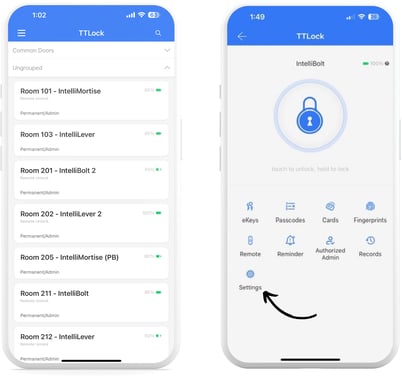
1. Select the lock you want to view the unlock status, then tap “Settings”
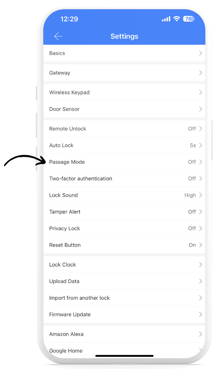
2. Tap on “Passage Mode”, and then tap the “Turn On” button.
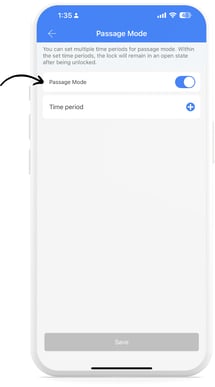
3. Tap the toggle on, and you will see the “Time Period” section appear.
4. Tap the blue “+” button, and select the days and the timeframe for which you want the lock to remain open.
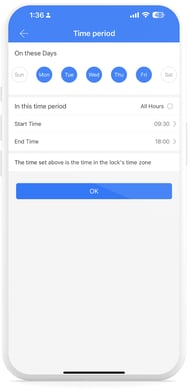
1. If you do not input a schedule, the lock will remain open until the passage mode is toggled off.
2. Auto Lock must be enabled for the lock to automatically lock at the end of the configured time period. See Auto Lock section.
3. With the free version of TTLock, users can only add one schedule per lock.
5. The final step to enable passage mode on a lock is to present any valid credential to the lock during the specified schedule. The lock will notify you that it’s in passage mode.
- [Getting Started](https://help.33lock.com/getting-started?hsLang=en-us#main-content)
- [Understanding the Basics](https://help.33lock.com/getting-started?hsLang=en-us#understanding-the-basics)
- [Initial Setup](https://help.33lock.com/getting-started?hsLang=en-us#initial-setup)
- [Before You Buy](https://help.33lock.com/before-you-buy?hsLang=en-us#main-content)
- [Door Templates & Compatibility Guides](https://help.33lock.com/before-you-buy?hsLang=en-us#door-templates-compatibility-guides)
- [IntelliMortise Cover Plates](https://help.33lock.com/before-you-buy?hsLang=en-us#intellimortise-cover-plates)
- [Installation](https://help.33lock.com/installation?hsLang=en-us#main-content)
- [Installation Manual](https://help.33lock.com/installation?hsLang=en-us#installation-manual)
- [Post-Installation Checklist](https://help.33lock.com/installation?hsLang=en-us#post-installation-checklist)
- [Managing Devices](https://help.33lock.com/managing-devices?hsLang=en-us#main-content)
- [Connecting your Devices](https://help.33lock.com/managing-devices?hsLang=en-us#connecting-your-devices)
- [Lock Features & Settings](https://help.33lock.com/managing-devices?hsLang=en-us#lock-features-settings)
- [Managing Lock Access](https://help.33lock.com/managing-devices?hsLang=en-us#managing-lock-access)
- [Lock Adminstration](https://help.33lock.com/managing-devices?hsLang=en-us#lock-adminstration)
- [Integrations](https://help.33lock.com/integrations?hsLang=en-us)
- [FAQs](https://help.33lock.com/faqs?hsLang=en-us#main-content)
- [General Lock Questions](https://help.33lock.com/faqs?hsLang=en-us#general-lock-questions)
- [Installation & Compatibility Questions](https://help.33lock.com/faqs?hsLang=en-us#installation-compatibility-questions)
- [Gateway Questions](https://help.33lock.com/faqs?hsLang=en-us#gateway-questions)
- [Troubleshooting Hub](https://help.33lock.com/troubleshooting-hub?hsLang=en-us#main-content)
- [Hardware Troubleshooting](https://help.33lock.com/troubleshooting-hub?hsLang=en-us#hardware-troubleshooting)
- [Warranty & Returns](https://help.33lock.com/warranty-returns?hsLang=en-us)
- [PRODUCTS](https://www.33lock.com/products)
- [PARTNERS](https://www.33lock.com/partners)
- [ABOUT US](https://www.33lock.com/about)
[%20Logo%20(5)-1.png?width=160&height=80&name=v%20(Dark%20BG%20variant)%20Logo%20(5)-1.png)](http://www.33lock.com)
[mailto:support@33lock.com](mailto:support@33lock.com)
Copyright © 2026, 33lock.com