---
title: Unlock (WiFi Open) on TTLock App
description: Remote Unlock (WiFi Open) lets you unlock doors from anywhere.
---
[Skip to content](https://help.33lock.com/remote-unlock-on-ttlock-app#main-content)
[%20Logo%20(5)-1.png?width=160&height=80&name=v%20(Dark%20BG%20variant)%20Logo%20(5)-1.png)](https://www.33lock.com)
- [PRODUCTS](https://www.33lock.com/products)
- [PARTNERS](https://www.33lock.com/partners)
- [ABOUT US](https://www.33lock.com/about)
Open main navigation
Close main navigation
- [PRODUCTS](https://www.33lock.com/products)
- [PARTNERS](https://www.33lock.com/partners)
- [ABOUT US](https://www.33lock.com/about)
How can we help you?
- There are no suggestions because the search field is empty.
1. [33 Lock Help Documentation](https://help.33lock.com/?hsLang=en-us)
2. [Managing Devices](https://help.33lock.com/managing-devices?hsLang=en-us)
3. [Managing Lock Access](https://help.33lock.com/managing-devices?hsLang=en-us#managing-lock-access)
# Unlock (WiFi Open) on TTLock App
### Overview
Remote Unlock (WiFi Open) feature allows users to unlock doors from any location, without needing to be near the lock.
This requires a [registered TTLock account](https://help.33lock.com/ttlock-account-registration?hsLang=en-us)
- Download the TTLock application on [Android](https://play.google.com/store/apps/details?id=com.tongtongsuo.app&hl=en_CA) or [iOS](https://apps.apple.com/us/app/ttlock/id1033046018) devices
- Access the TTLock Web System on desktop [here](https://lock2.ttlock.com/)
❗If you're using a third-party automation partner integrated with TTLock to manage access, remote unlock must be enabled.
❗Once enabled, this function can be performed from anywhere, so it's a good idea to consider the security implications before proceeding.
❗Lock must be connected to a [gateway](https://help.33lock.com/en-us/understanding-gateways?hsLang=en-us)
❗To enable remote unlock, it must be activated in the settings for each lock. [Follow these steps to turn on remote unlock.](https://help.33lock.com/remote-unlock?hsLang=en-us)
#### Steps to remotely unlock from app
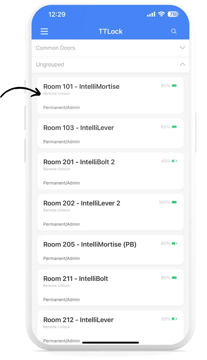
1. Select a lock from the main menu.
2. Tap on the small blue icon, then tap “Remote Unlock” when the confirmation prompt appears.
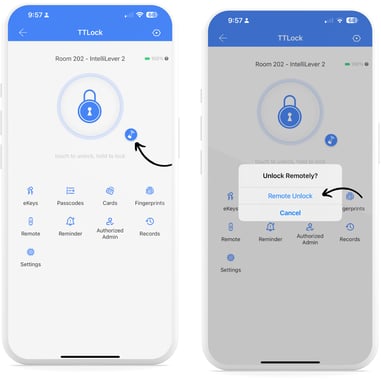
❗The large blue lock icon is used for opening with [eKeys](https://help.33lock.com/remote-unlock?hsLang=en-us) and requires the user to be connected to the lock via Bluetooth.
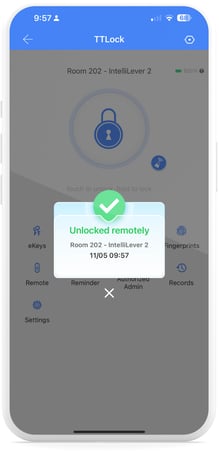
3. If remote unlock is successful, you will see a confirmation window.
#### Steps to remotely unlock from web system
If Remote Unlock is already enabled for a lock, you will see a WiFi icon directly under the lock name. If not, [follow these steps to turn on remote unlock.](https://help.33lock.com/remote-unlock?hsLang=en-us)
1. Click on the lock you want to remotely unlock.
2. On the lock page, click on “Remote”, then click on “Remote Unlock”.
- [Getting Started](https://help.33lock.com/getting-started?hsLang=en-us#main-content)
- [Understanding the Basics](https://help.33lock.com/getting-started?hsLang=en-us#understanding-the-basics)
- [Initial Setup](https://help.33lock.com/getting-started?hsLang=en-us#initial-setup)
- [Before You Buy](https://help.33lock.com/before-you-buy?hsLang=en-us#main-content)
- [Door Templates & Compatibility Guides](https://help.33lock.com/before-you-buy?hsLang=en-us#door-templates-compatibility-guides)
- [IntelliMortise Cover Plates](https://help.33lock.com/before-you-buy?hsLang=en-us#intellimortise-cover-plates)
- [Installation](https://help.33lock.com/installation?hsLang=en-us#main-content)
- [Installation Manual](https://help.33lock.com/installation?hsLang=en-us#installation-manual)
- [Post-Installation Checklist](https://help.33lock.com/installation?hsLang=en-us#post-installation-checklist)
- [Managing Devices](https://help.33lock.com/managing-devices?hsLang=en-us#main-content)
- [Connecting your Devices](https://help.33lock.com/managing-devices?hsLang=en-us#connecting-your-devices)
- [Lock Features & Settings](https://help.33lock.com/managing-devices?hsLang=en-us#lock-features-settings)
- [Managing Lock Access](https://help.33lock.com/managing-devices?hsLang=en-us#managing-lock-access)
- [Lock Adminstration](https://help.33lock.com/managing-devices?hsLang=en-us#lock-adminstration)
- [Integrations](https://help.33lock.com/integrations?hsLang=en-us)
- [FAQs](https://help.33lock.com/faqs?hsLang=en-us#main-content)
- [General Lock Questions](https://help.33lock.com/faqs?hsLang=en-us#general-lock-questions)
- [Installation & Compatibility Questions](https://help.33lock.com/faqs?hsLang=en-us#installation-compatibility-questions)
- [Gateway Questions](https://help.33lock.com/faqs?hsLang=en-us#gateway-questions)
- [Troubleshooting Hub](https://help.33lock.com/troubleshooting-hub?hsLang=en-us#main-content)
- [Hardware Troubleshooting](https://help.33lock.com/troubleshooting-hub?hsLang=en-us#hardware-troubleshooting)
- [Warranty & Returns](https://help.33lock.com/warranty-returns?hsLang=en-us)
- [PRODUCTS](https://www.33lock.com/products)
- [PARTNERS](https://www.33lock.com/partners)
- [ABOUT US](https://www.33lock.com/about)
[%20Logo%20(5)-1.png?width=160&height=80&name=v%20(Dark%20BG%20variant)%20Logo%20(5)-1.png)](http://www.33lock.com)
[mailto:support@33lock.com](mailto:support@33lock.com)
Copyright © 2026, 33lock.com