---
title: Updating Gateway Firmware
description: How to update gateway firmware
---
[Skip to content](https://help.33lock.com/updating-gateway-firmware#main-content)
[%20Logo%20(5)-1.png?width=160&height=80&name=v%20(Dark%20BG%20variant)%20Logo%20(5)-1.png)](https://www.33lock.com)
- [PRODUCTS](https://www.33lock.com/products)
- [PARTNERS](https://www.33lock.com/partners)
- [ABOUT US](https://www.33lock.com/about)
Open main navigation
Close main navigation
- [PRODUCTS](https://www.33lock.com/products)
- [PARTNERS](https://www.33lock.com/partners)
- [ABOUT US](https://www.33lock.com/about)
How can we help you?
- There are no suggestions because the search field is empty.
1. [33 Lock Help Documentation](https://help.33lock.com/?hsLang=en-us)
2. [Managing Devices](https://help.33lock.com/managing-devices?hsLang=en-us)
3. [Lock Adminstration](https://help.33lock.com/managing-devices?hsLang=en-us#lock-adminstration)
# Updating Gateway Firmware
### Overview
This article explains how to check for and install the latest firmware update for your gateway using the TTLock app. Before you begin, confirm that you have access to your TTLock account, Bluetooth is enabled on your mobile device, and you are within range of the gateway so the update can complete successfully.
❗This requires a registered TTLock account
- Download the TTLock application on *[Android](https://play.google.com/store/apps/details?id=com.tongtongsuo.app&hl=en_CA)* or [iOS](https://apps.apple.com/us/app/ttlock/id1033046018) devices
- Access the TTLock Web System on desktop *[here](https://lock2.ttlock.com/)*
❗Must be next to the hardware with Bluetooth enabled on your mobile device
#### Steps to update gateway firmware
1. Open your TTLock account on the phone.
2. Click on the category Gateway and select the specific gateway you want to check the update for by clicking on it.
.png?width=200&height=400&name=Photo%20Frames%20Help%20Docs%20(1).png)
3. It will take to you to the Gateway settings page. Click on Gateway update.
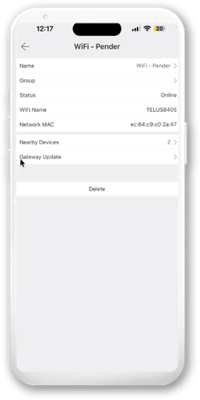
4. If an update is available you will see "New Version Available".
1. Click on the blue update button then click okay to start the update.
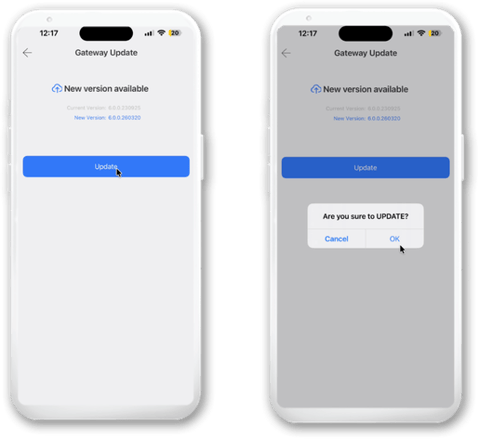
5. The update process will begin.
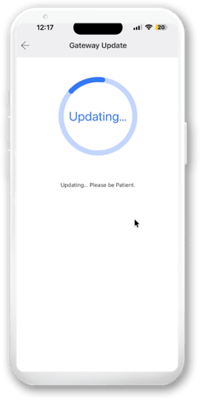
❗This process will take 30-60 seconds, and you must remain in proximity of the Gateway. If there is an error, you can try again, and the firmware will install on the Gateway.
❗During the update, keep the application open on the Gateway update page.
- [Getting Started](https://help.33lock.com/getting-started?hsLang=en-us#main-content)
- [Understanding the Basics](https://help.33lock.com/getting-started?hsLang=en-us#understanding-the-basics)
- [Initial Setup](https://help.33lock.com/getting-started?hsLang=en-us#initial-setup)
- [Before You Buy](https://help.33lock.com/before-you-buy?hsLang=en-us#main-content)
- [Door Templates & Compatibility Guides](https://help.33lock.com/before-you-buy?hsLang=en-us#door-templates-compatibility-guides)
- [IntelliMortise Cover Plates](https://help.33lock.com/before-you-buy?hsLang=en-us#intellimortise-cover-plates)
- [Installation](https://help.33lock.com/installation?hsLang=en-us#main-content)
- [Installation Manual](https://help.33lock.com/installation?hsLang=en-us#installation-manual)
- [Post-Installation Checklist](https://help.33lock.com/installation?hsLang=en-us#post-installation-checklist)
- [Managing Devices](https://help.33lock.com/managing-devices?hsLang=en-us#main-content)
- [Connecting your Devices](https://help.33lock.com/managing-devices?hsLang=en-us#connecting-your-devices)
- [Lock Features & Settings](https://help.33lock.com/managing-devices?hsLang=en-us#lock-features-settings)
- [Managing Lock Access](https://help.33lock.com/managing-devices?hsLang=en-us#managing-lock-access)
- [Lock Adminstration](https://help.33lock.com/managing-devices?hsLang=en-us#lock-adminstration)
- [Integrations](https://help.33lock.com/integrations?hsLang=en-us)
- [FAQs](https://help.33lock.com/faqs?hsLang=en-us#main-content)
- [General Lock Questions](https://help.33lock.com/faqs?hsLang=en-us#general-lock-questions)
- [Installation & Compatibility Questions](https://help.33lock.com/faqs?hsLang=en-us#installation-compatibility-questions)
- [Gateway Questions](https://help.33lock.com/faqs?hsLang=en-us#gateway-questions)
- [Troubleshooting Hub](https://help.33lock.com/troubleshooting-hub?hsLang=en-us#main-content)
- [Hardware Troubleshooting](https://help.33lock.com/troubleshooting-hub?hsLang=en-us#hardware-troubleshooting)
- [Warranty & Returns](https://help.33lock.com/warranty-returns?hsLang=en-us)
- [PRODUCTS](https://www.33lock.com/products)
- [PARTNERS](https://www.33lock.com/partners)
- [ABOUT US](https://www.33lock.com/about)
[%20Logo%20(5)-1.png?width=160&height=80&name=v%20(Dark%20BG%20variant)%20Logo%20(5)-1.png)](http://www.33lock.com)
[mailto:support@33lock.com](mailto:support@33lock.com)
Copyright © 2026, 33lock.com