%20Logo%20(5)-1.png?width=160&height=80&name=v%20(Dark%20BG%20variant)%20Logo%20(5)-1.png)
❗This requires a registered TTLock account
- Download the TTLock application on Android or iOS devices
- Access the TTLock Web System on desktop here
❗Must be next to the hardware with Bluetooth enabled on your mobile device
Steps to adjust lock volume
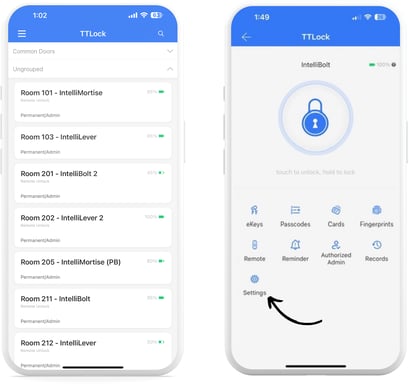
- Select the lock you want to view the unlock status, then tap “Settings”.
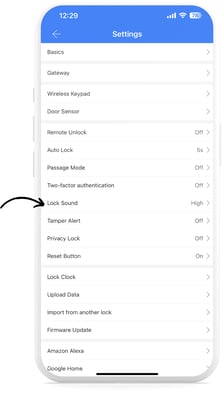
- Tap on “Lock Sound”.
- From here, you can either:
- Turn the lock sound on or off by tapping on the toggle.
- If the lock toggle is on, you can select the volume you want to set for the lock.
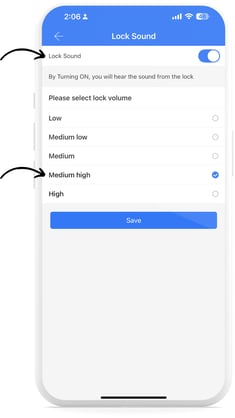
- Once Lock Sound volume has been adjusted, click “Save”.