%20Logo%20(5)-1.png?width=160&height=80&name=v%20(Dark%20BG%20variant)%20Logo%20(5)-1.png)
This requires a registered TTLock account
- Download the TTLock application on Android or iOS devices
- Access the TTLock Web System on desktop here
❗All locks are equipped with auto lock functionality. However, only specific locks are designed to operate without auto lock.
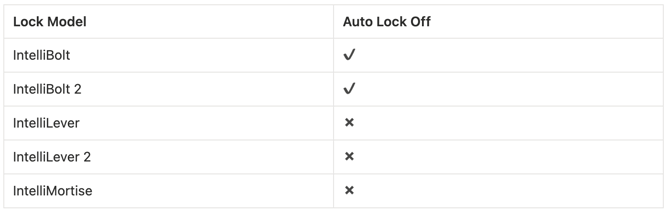
Steps to configure auto lock
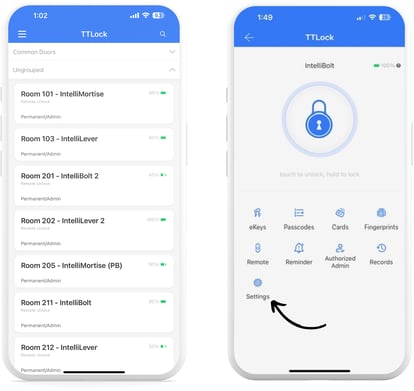
- Select the lock you want to view the unlock status, then tap “Settings”.
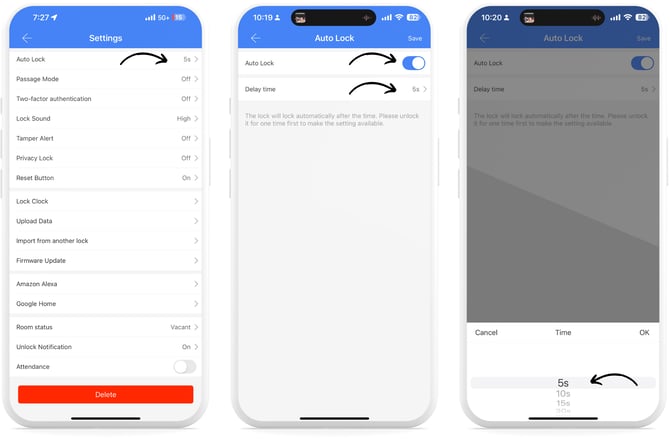
- Tap on “Auto Lock” and toggle Auto Lock On or Off. If toggled on, tap on “Delay Time” and specify the seconds that a lock will auto lock.