%20Logo%20(5)-1.png?width=160&height=80&name=v%20(Dark%20BG%20variant)%20Logo%20(5)-1.png)
How Smart Locks Connect to Gateways for Remote Management
33 Lock provides integrated smart lock solutions for hotels, motels, resorts, and other hospitality properties across North America. Each solution is built as an end-to-end system—combining smart locks, gateways, and software—to enable secure, reliable remote access management through the TTLock application.
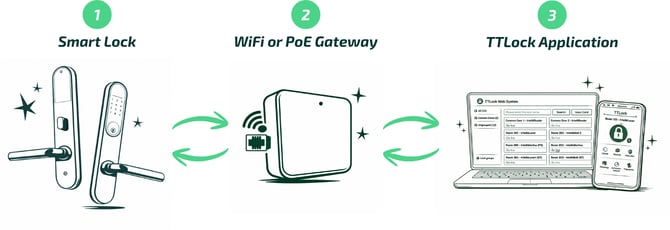
The sections below explain how the system works, following the numbered flow shown in the diagram.
1. 33 Lock Smart Locks
On the left side of the diagram (1) are 33 Lock smart locks installed on guest rooms and common area or shared-access doors.
Key characteristics include:
-
Battery-powered operation, eliminating the need for hardwiring to the building’s electrical system
-
Local Bluetooth communication for secure, short-range data exchange
-
Continued door operation even if the property temporarily loses internet connectivity
Locks can operate offline via Bluetooth, however, the users needs to be physically near the door to modify access, view usage logs, etc. To enable full remote management, the locks must be paired with one or more a WiFi or PoE gateway.s
2. Wi-Fi or PoE Gateway
At the center of the diagram (2) is the Wi-Fi or Power over Ethernet (PoE) gateway. This device acts as the communication bridge between the door hardware and the internet.
The gateway:
-
Connects to nearby locks using Bluetooth within a range of 20-30 ft depending on physical obstacles
-
Connects to the property network via Wi-Fi or a wired Ethernet (PoE) connection
-
Supports communication with multiple locks within its coverage area, depending on distance, layout, and building materials
- Supports a many-to-many relationship, where a single gateway can communicate with multiple locks and a single lock can be associated with multiple gateways for redundancy
Once a lock is associated with a gateway, the gateway establishes two-way communication between the lock and the TTLock cloud. This connection allows remote commands to be delivered to the door and enables the lock to report status and activity back to the system.
3. TTLock Application
On the right side of the diagram (3) is the TTLock web and mobile application. This is a free application available to all 33 Lock customers, and serves as the primary interface where staff configure, manage, and monitor access.
When an action is performed in the TTLock application, the instruction follows this path:
TTLock Application → Gateway → Smart Lock
Because the gateway maintains an active connection between the cloud and the door, authorized users can manage access from anywhere with an internet connection.
With locks connected to the internet via a gateway, users can:
-
Create, update, or revoke PIN codes without visiting the door
-
Issue mobile keys to staff, managers, or approved vendors
-
Lock or unlock doors remotely in real time
-
Review access events and unlock history for auditing and security
-
Adjust lock settings such as auto-lock timing or passage mode
-
Monitor battery levels and connectivity to support proactive maintenance
Why This Setup Matters for Hospitality
For hotels, motels, and resorts, this connected architecture delivers meaningful operational benefits:
-
Centralized access control across rooms, buildings, or entire properties
-
Faster and more flexible guest check-ins, including late arrivals
-
Reduced need for staff to perform on-site access changes
-
Improved visibility into door activity to support security and incident response
If a gateway is not installed, locks continue to operate using Bluetooth credentials and stored access rules. However, the remote management features described in step 3 are limited or unavailable, and most changes must be made on-site.