%20Logo%20(5)-1.png?width=160&height=80&name=v%20(Dark%20BG%20variant)%20Logo%20(5)-1.png)
❗The TTLock platform will notify you when the battery life of your lock is 20% or less. It is recommended that you change your lock’s batteries when you receive this notification.
❗All 33 Locks come enabled with an auxiliary power port, located on the outer side of the lock at the bottom of the lock body.
❗If lock batteries are completely dead and you can not enter room, use the back-up key or backup power to open the door, and then proceed to the following steps.
Use the following guide to determine what replacement batteries you need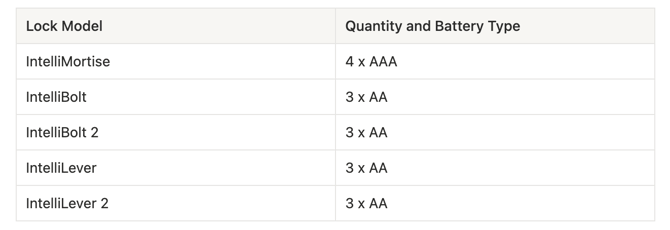
Steps to change batteries
- Open the door and remove the battery cover from the back of the lock and replace batteries. When new batteries are inserted, the touchscreen of the lock will light up.
- The lock will reconnect to the closest Gateways within a few minutes.
Backup Power
- Ensure your power bank is charged
- Plug the USB cable into your power bank
- Plug the USB-C side of the cable into your lock and the lock should turn on
- Enter any valid credential, open the door and replace the batteries
❗If the lock does not turn on after following the steps above, a physical key override can be used to open the lock.
Backup power demonstration video