%20Logo%20(5)-1.png?width=160&height=80&name=v%20(Dark%20BG%20variant)%20Logo%20(5)-1.png)
Overview
Various lock features are dependent on the lock time being accurate. It’s important to ensure your lock times are calibrated, specifically during daylight savings.
❗If the lock is connected to a gateway, the lock time will automatically calibrate, including during daylight savings.
Steps to calibrate lock time
-
Select the lock you want to calibrate time for, then tap “Settings”.
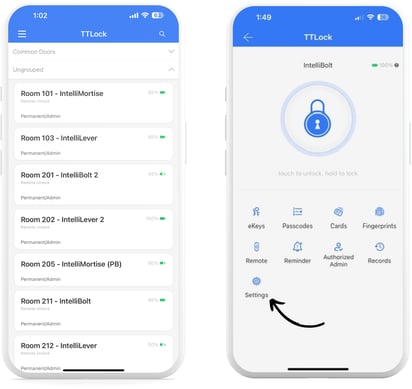
- Tap on “Lock Clock”, and check the time. If the lock time is incorrect, tap “Calibrate Time” and the clock will sync with your mobile devices time.