%20Logo%20(5)-1.png?width=160&height=80&name=v%20(Dark%20BG%20variant)%20Logo%20(5)-1.png)
This requires a registered TTLock account
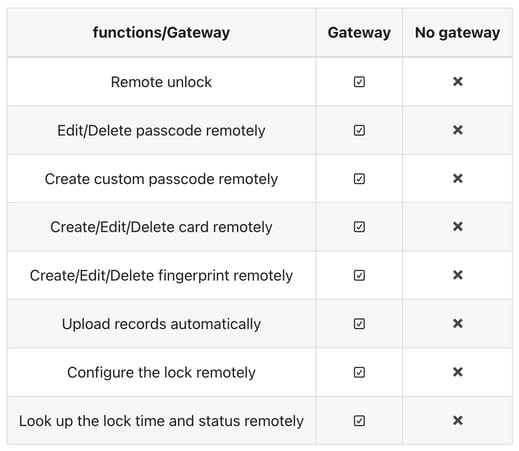
IMPORTANT: IntelliHub gateways are only required if online capabilities are desired. They are not required to operate an offline capabilities.
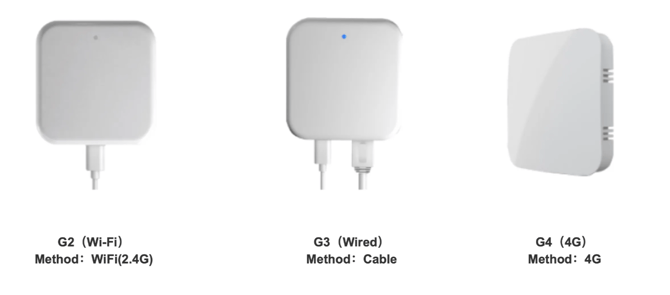
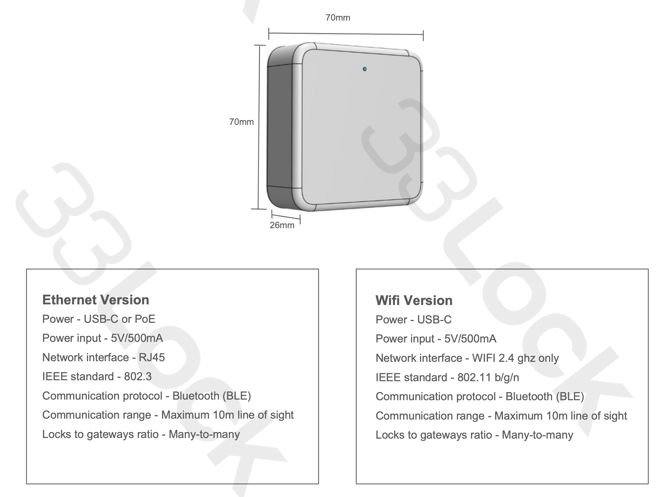
The IntelliHub is available in two versions: ethernet and wifi. Please select the appropriate setup for your property based on the building's network infrastructure. In many cases, a combination of both ethernet and wifi versions ensures optimal flexibility and coverage. We recommend consulting with a 33 Lock representative for expert advice prior to installation.
The gateways establish a mesh network with the locks, enabling a many-to-many connection. If enhanced performance or extended coverage is needed, additional gateways can be added at any point in time.
Gateways can be installed in either the common areas (hallways) or inside suites, or a combination of the two. If installing in rooms, it is recommended to install 1 gateway per 1 lock (1:1). If installing in hallways, a higher ratio can likely be achieved such as a 2:1 or 3:1. 7
Network requirements
- If you are using the G2 (WiFi) version of the gateway, your network needs to support a 2.4GHz frequency. It is recommended to have a dedicated SSID for your devices to enhance security and performance.
- If you are using the G3 (Cable) or G3P (PoE) version of the gateway, be sure to configure your firewall settings to permit the device to establish a connection to your network through port 2999.
- If you are using the G4 (4G) version of the gateway, you will need to obtain a compatible SIM card and service provider.