%20Logo%20(5)-1.png?width=160&height=80&name=v%20(Dark%20BG%20variant)%20Logo%20(5)-1.png)
IntelliMortise Compatibility Check available for download here
Overview
33 Locks are compatible with most hotel and residential doors. We offer models designed for mortise, cylindrical, and deadbolt prepped frames. If you’re unsure, contact us with door specs and we’ll help you select the right fit.
If you’ve ordered a 33 Lock sample kit, we recommend installing it on one of your existing doors to confirm the fit. By following the steps below, you can successfully install the sample lock, assess any necessary door modifications, and determine if cover plates are needed.
❗ In many cases, an in-house team member, such as a maintenance person, can handle the installation. However, you also have the option of hiring a local locksmith for assistance.
IntelliMortise Compatibility
Steps to follow:
-
Remove the existing lockset from the test door, including the mortise chassis from the side of the door.
-
Insert the new mortise chassis into the edge of the door, in the same orientation as the existing one. If the mortise does not fit, either height or width-wise, note this as modification that would be required during installation
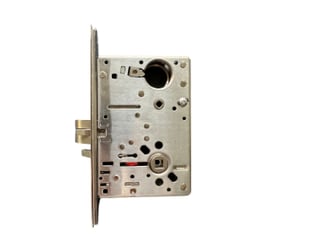
-
Confirm if cover plates are required:
- If the door has an existing cover plate: Measure the dimensions using the lever hole as a reference point. Record measurements A, B, C, and D (as shown in the illustration below) and compare them with the cover plate dimensions found here to ensure proper coverage. Repeat on the back side of the door.
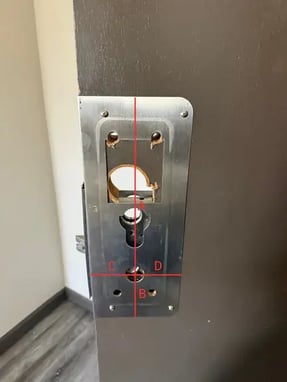
-
If the door does not have an existing cover plate: Hold the new lock up to the door to confirm if a cover plate is needed (as shown in the illustration below). Confirm the new cover plate will cover the existing holes, using the lever as a reference point. Dimensions for the plate can be found here. Repeat on the back side of the door.
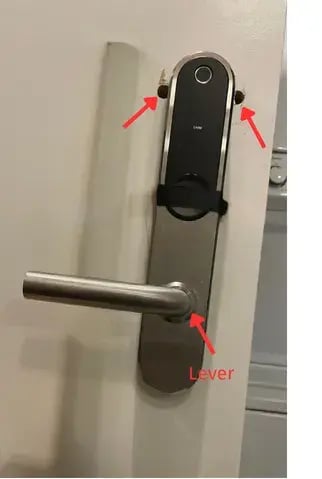
❗If If the standard cover plate dimensions will not cover the existing holes, a custom cover plate may be required.
- If the door has an existing cover plate: Measure the dimensions using the lever hole as a reference point. Record measurements A, B, C, and D (as shown in the illustration below) and compare them with the cover plate dimensions found here to ensure proper coverage. Repeat on the back side of the door.
- Print the door templates from pages 16 and 17 here on an 8.5”x11” sheet of paper and verify they are to scale.
- Align the templates with the front and back of the door. If new holes are required, mark them on the door. See illustration below.
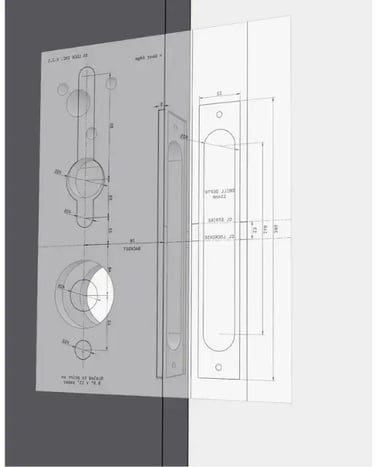
- Remove the existing strike plate and compare it with the new strike plate. Make note if there are any differences.
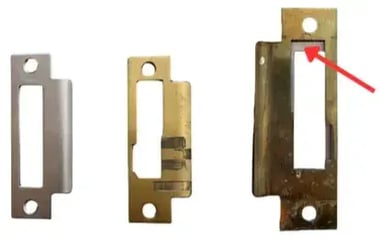
❗If there are differences, custom strike plates may be required. - Drill the required holes in the door.
- Install the new strike plate.
- Refer to the installation guide for installing the sample lock on the door.
- Confirm that the lock functions properly once it’s installed.
Checklist:
- Does the standard cover plate cover the existing footprint from the previous lock?
- Does the new mortise chassis fit into the existing prep?
- Do the lever holes line up with the existing prep?
- Is the new strike plate the same dimensions as the previous one?
- Does the new lock operate properly?