%20Logo%20(5)-1.png?width=160&height=80&name=v%20(Dark%20BG%20variant)%20Logo%20(5)-1.png)
Overview
33 Lock smart locks are powered by standard batteries and include backup power options to help prevent downtime. Understanding how the primary and backup power systems work ensures reliable operation and uninterrupted access.
The TTLock platform will notify you when your lock’s battery level reaches 20% or lower. It is recommended to replace the batteries as soon as you receive this notification.
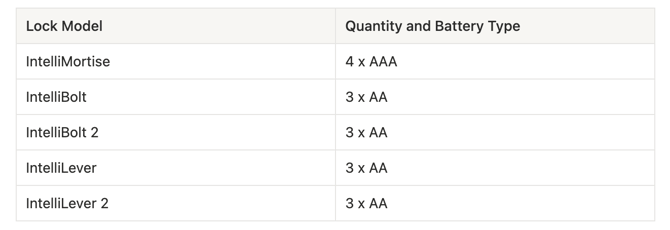
Refer to the guide below to determine the correct replacement batteries for your lock.
Use the following guide to determine what replacement batteries you need
Steps to change batteries
- Open the door.
- Remove the battery cover from the interior side of the lock.
- Replace the batteries.
- Once new batteries are inserted, the touchscreen will light up.
- The lock will reconnect to the nearest gateway within a few minutes.
Backup Power
All 33 Locks include an auxiliary power port located on the exterior side of the lock at the bottom of the lock body.
❗If the batteries are completely depleted and you cannot enter the room, use the backup key or auxiliary power to unlock the door, then replace the batteries.
- Ensure your power bank is charged
- Plug the USB cable into your power bank
- Connect the USB-C end to the lock.
- The lock should turn on
- Enter any valid credential, open the door and replace the batteries
❗If the lock does not power on after following these steps, use the physical key override to open the lock.