%20Logo%20(5)-1.png?width=160&height=80&name=v%20(Dark%20BG%20variant)%20Logo%20(5)-1.png)
Overview
To remotely control access to your lock, the Remote Unlock function must be enabled in the TTLock app. This setting allows the lock to receive commands over the internet and is required for remote unlocking, whether through the TTLock app directly or via supported third-party integrations. Without this feature enabled, remote access will not function.
❗This requires a registered TTLock account
- Download the TTLock application on Android or iOS devices
- Access the TTLock Web System on desktop here
❗Must be next to the hardware with Bluetooth enabled on your mobile device
Steps to turn on remote unlock
- Determine if remote unlock is already on.
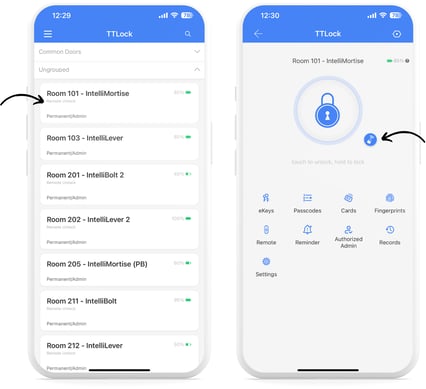
- If remote unlock is already turned on, you will see the words “Remote Unlock” in grey, directly under the lock name; OR you can see the blue network icon once a lock is selected.
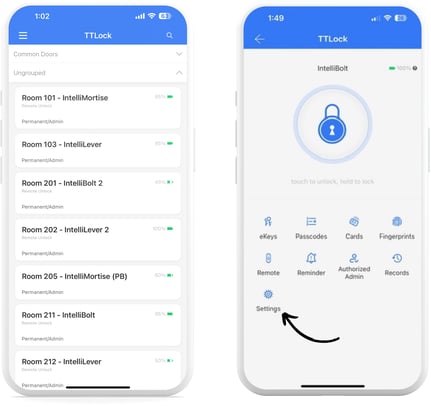
- If remote unlock is not already turned on, select the lock that you want to enable remote unlock, then tap on “Settings”.
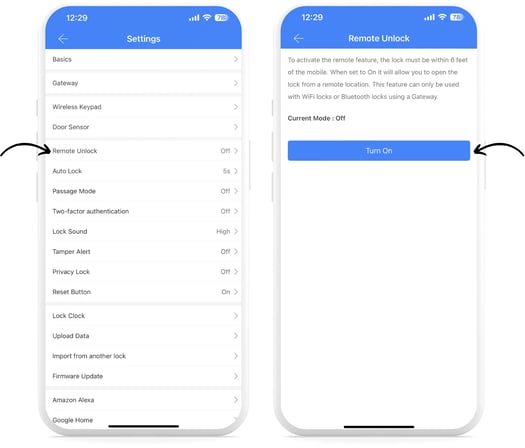
- Tap on “Remote Unlock”, then Tap the button to “Turn On”.